Quoting
A quote used to be a spreadsheet and a chase for prices. It is now a guided configuration with the rules built in.
01 · The problem
The spreadsheet was quick; the answers were not
Filling in a template took little time. What took time was knowing the price: a quote could wait until every price line had been resolved by someone.
Mistakes came from what was never switched on, such as an endpaper section. Locked cells were unlocked and formulas broken, and some salespeople worked from their own, older copy of the template.
The goal was not a nicer spreadsheet. It was to make the right quote the easy one.
02 · The configurator
Seven steps, three columns
The configurator guides a quote from client to final check. The screen always has the same three columns, so nothing moves while you work: where you are, what to decide, and what it produces.
- 1 · ClientPick or create the client once; the record is shared with every other app.
- 2 · ProductBooks, folded leaflets, maps, posters, point-of-sale displays and packaging.
- 3 · Format and runsSize, and up to three print runs per option, compared side by side.
- 4 · PiecesCover, text block, endpapers, dust jacket and inserts, each with its own paper and inks.
- 5 · FinishesBinding, laminating, varnish and other finishing, with their consequences visible.
- 6 · Supply and deliveryPaper from stock or bought in, packing, pallets and transport.
- 7 · CheckWhat is missing, and which rules apply and where they come from.
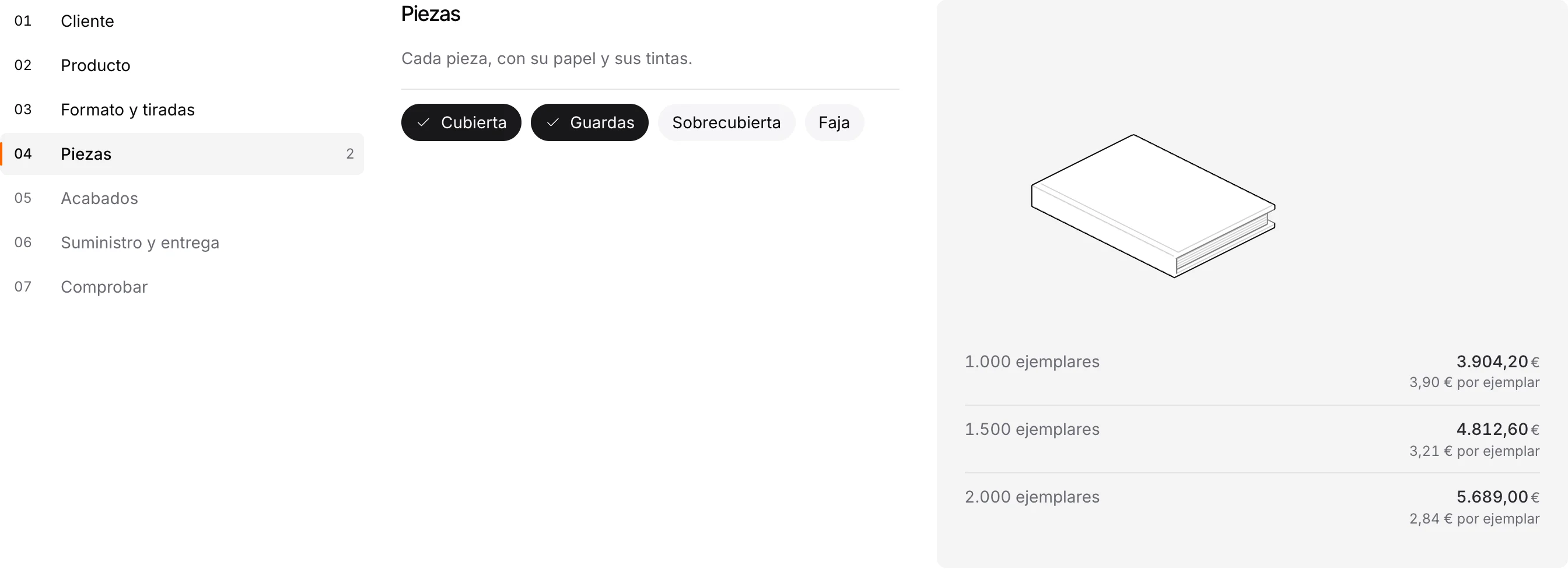
- Seven steps; the active one is marked on the rail.
- Optional parts are switched on here, so none gets forgotten.
- The book is drawn live as you choose.
- The price per run updates with every change.
03 · The live view
A product that draws itself as you define it
The right-hand column draws the product from the parameters you have set: format, thickness of the spine from the page count and paper, finishes. A book builds up in front of you.
The dashed-to-solid change is deliberate. It answers the question that spreadsheets never did: what is still missing?
04 · Check before sending
Rules that say where they come from
The last step lists what is missing and which rules apply. Every rule shows its origin: a tariff, a business policy or a physical limit.
Business rules can be overridden with a reason. The reason field appears only when it is needed and is kept with the quote. Physical rules cannot be overridden. A book that cannot be bound is not a negotiation.
05 · Costs and tariffs
Change a price knowing what it will touch
Prices are calculated on the server, in modules: general, text block, cover, endpapers, dust jacket, binding, transport and point of sale. Costs never reach the browser of someone who is not allowed to see them.
Tariffs are versioned. Before a change applies, a preview shows its impact on existing quotes. After applying, it can be undone.
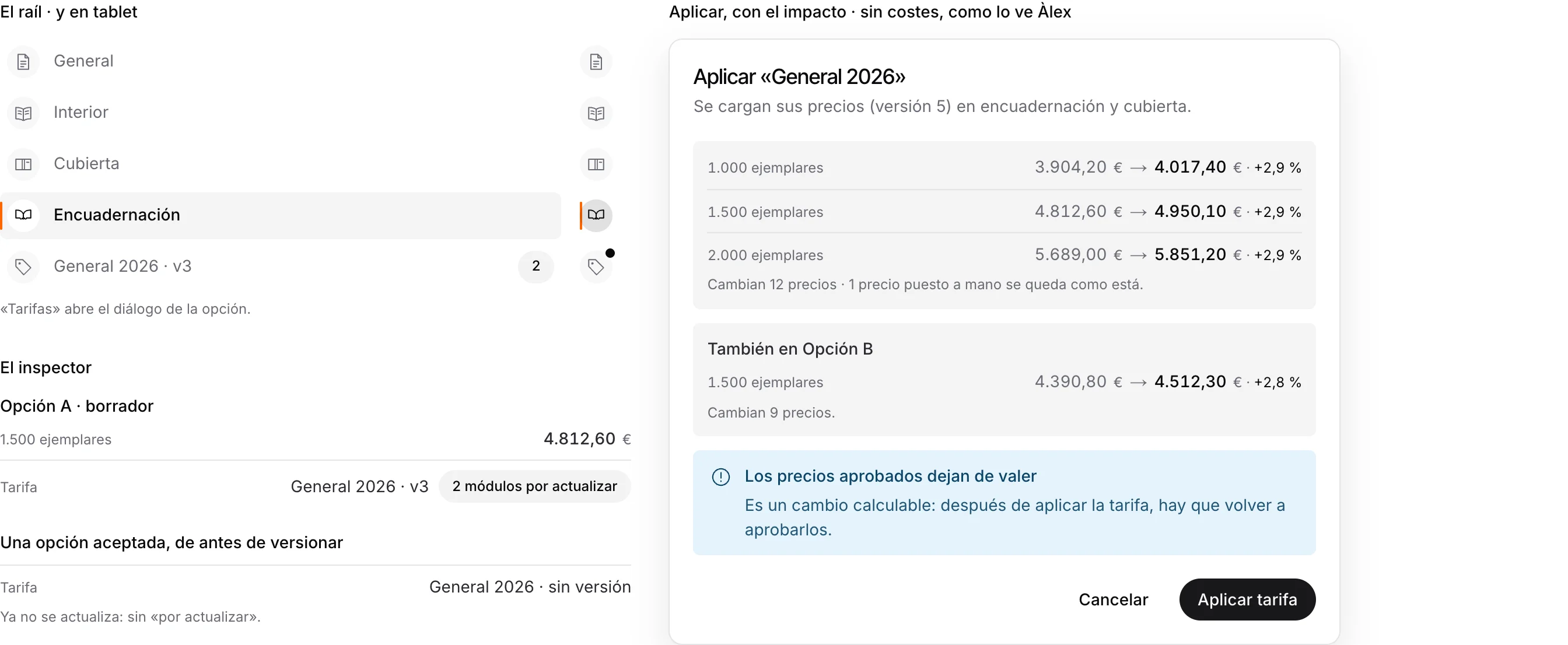
- The rail marks the module the tariff changes.
- Old and new price for each run, before anything is applied.
- Other options of the same quote count too.
- Approved prices stop counting and must be approved again.
- The inspector says which modules are out of date.
06 · Real geometry
Boxes and pallets calculated, not guessed
Transport used to be an estimate. Packing is now computed from the real size of the book: how many fit in a box, how many boxes in a layer, how many layers on a pallet.
Paper from stock is valued at its average cost, so a quote reflects what is actually on the shelf.
07 · From quote to order
A record that tells you whose turn it is
A quote moves from draft to review, sign-off and acceptance. Pricing above a set amount needs approval. The header always shows the next action, and only to the person who holds the turn.
Once accepted, the offer is issued as a PDF that cannot be changed, and the quote becomes a production order, linked to it.
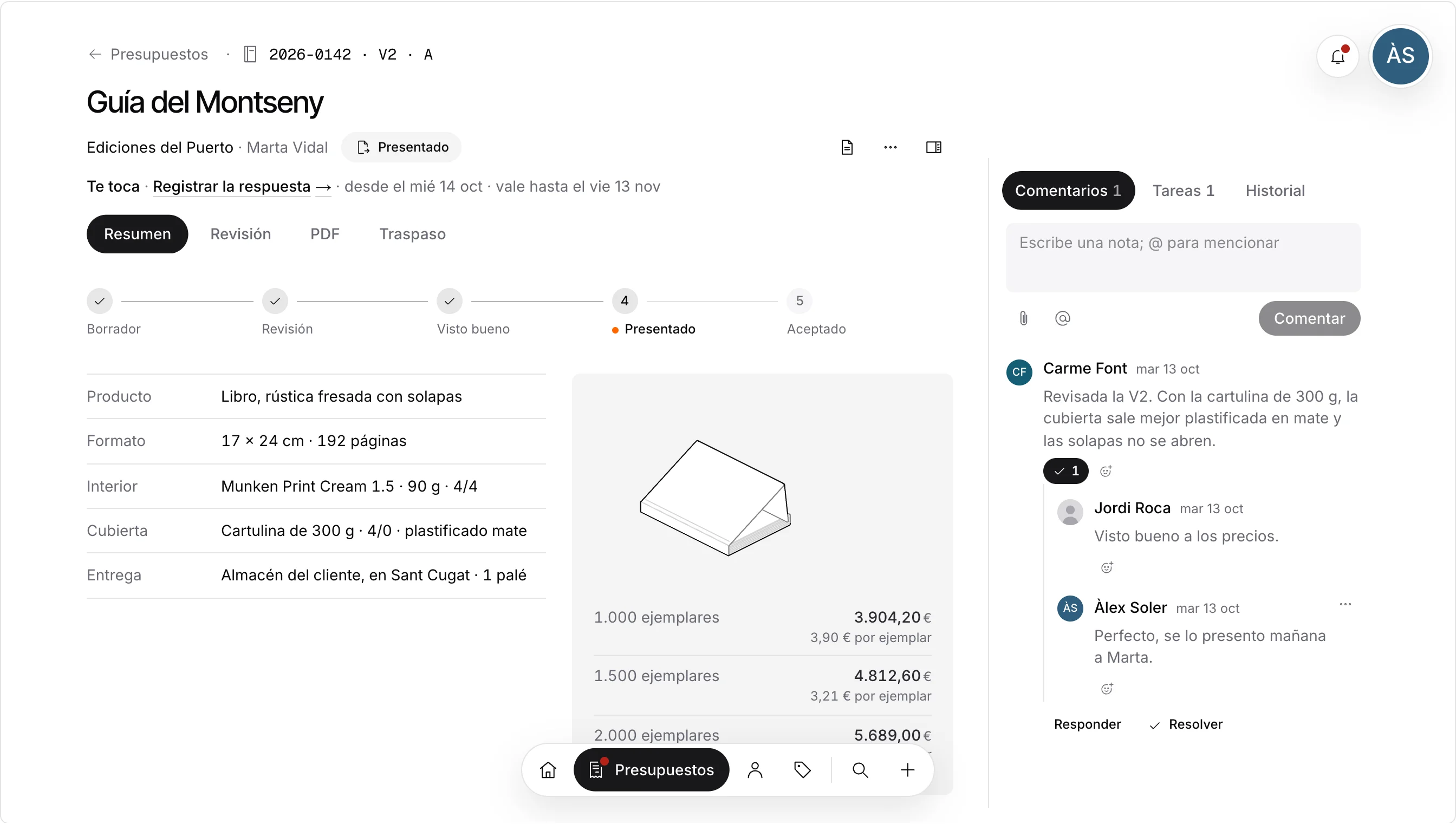
- Whose turn it is, and what to do next.
- The stage of the quote, from draft to accepted.
- The quote in a few lines.
- Comments, tasks and history in one place.
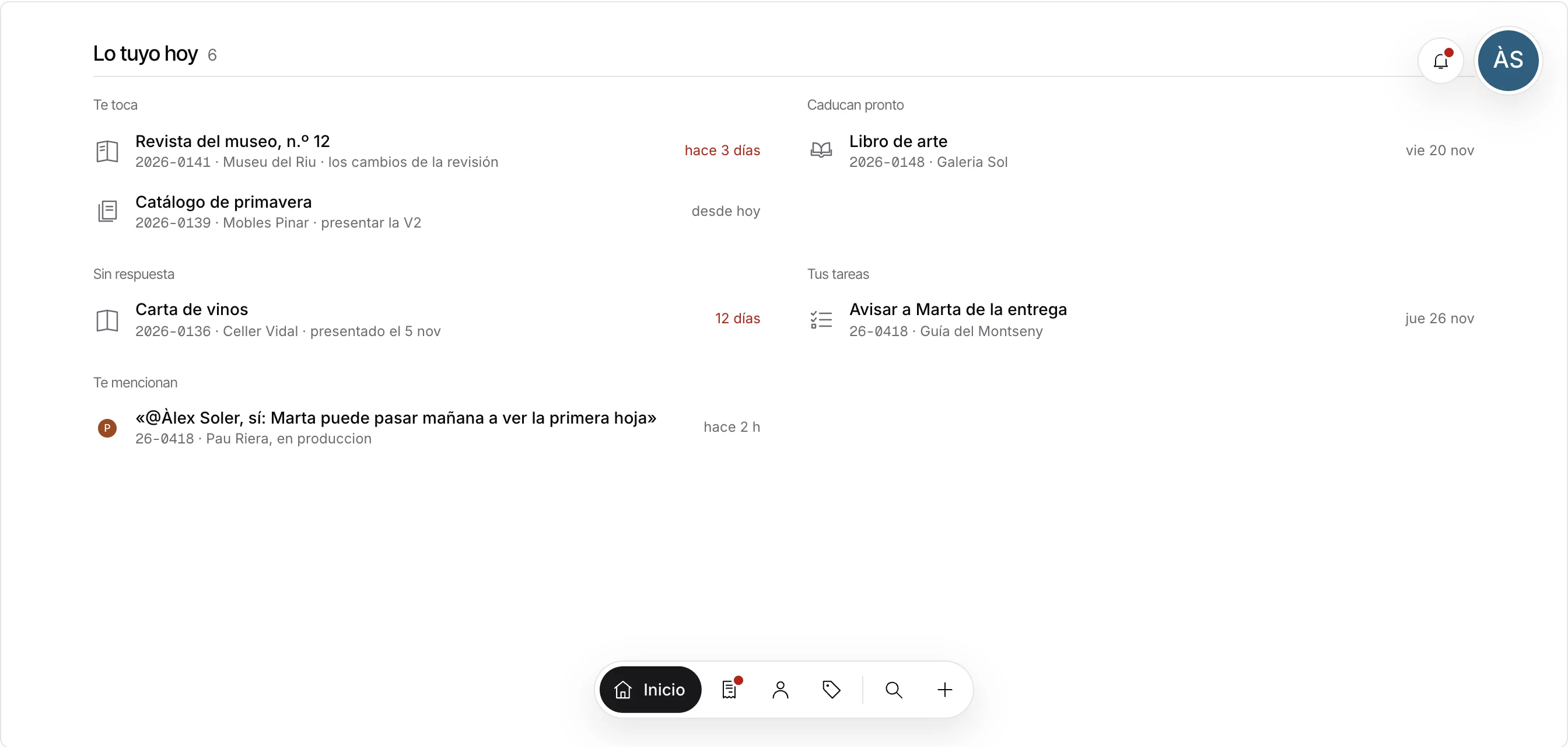
- What is waiting for you.
- Late items turn red, with how many days.
- Quotes about to expire.
- Where someone mentioned you.
08 · Clients
Each client, in numbers
Every lost quote asks for a reason. Over time, each client's record shows how often they ask, how many quotes they accept and why the others were lost, so price is no longer the only guess.
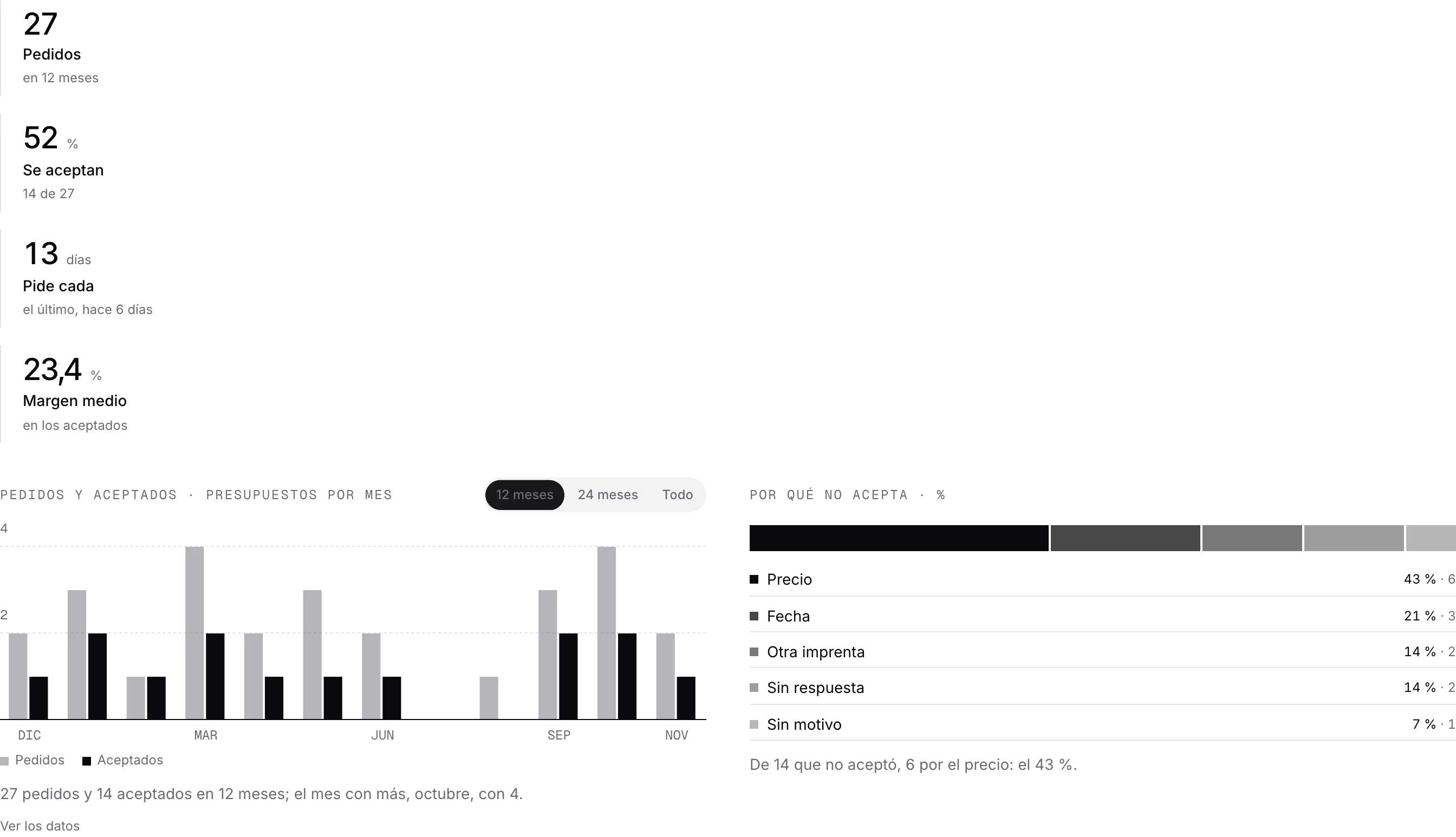
- How many quotes, how many accepted, how often, and the margin.
- Quotes and accepted orders, month by month.
- Why the rest were lost, by reason.